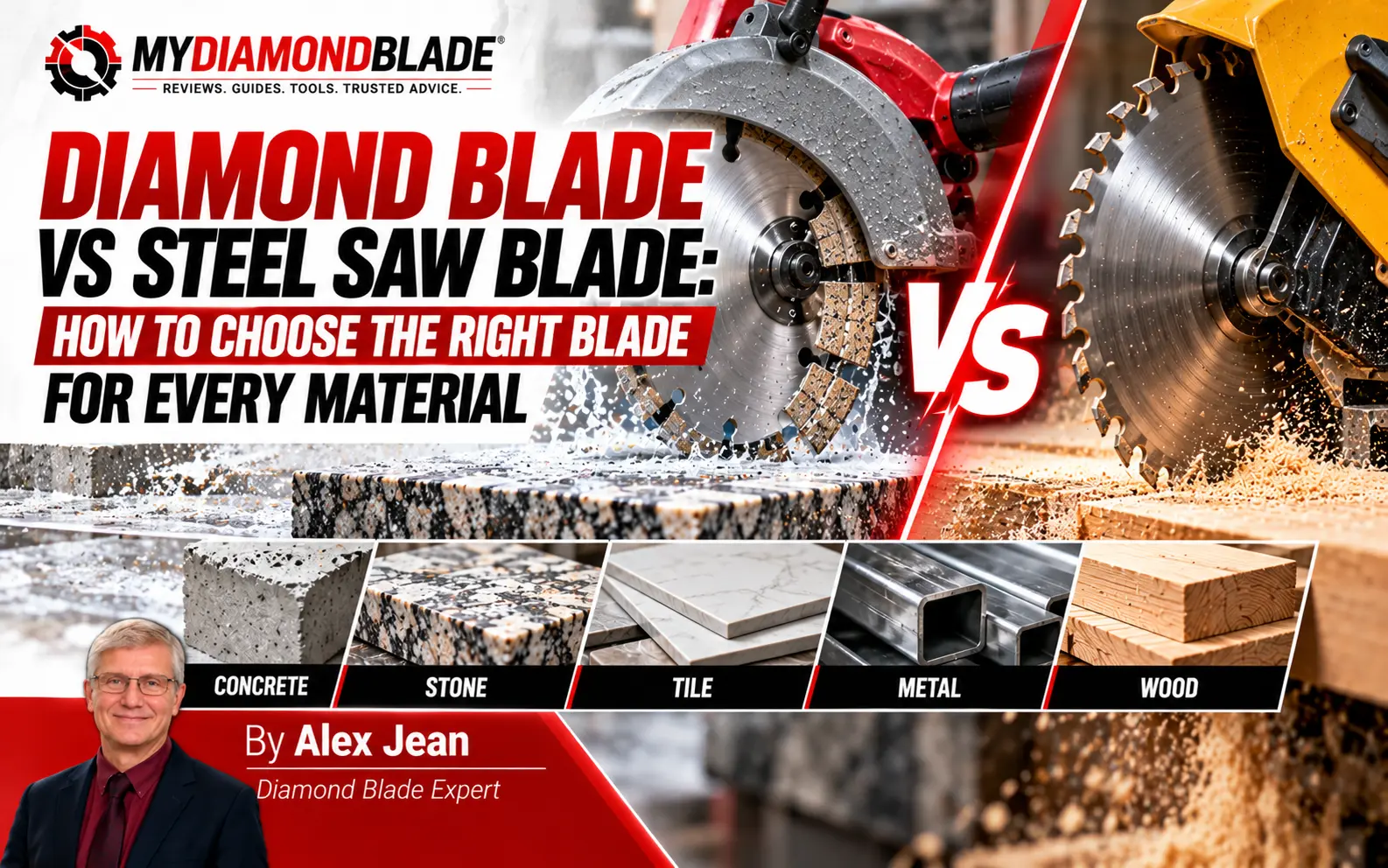
The blade glazes mid-cut. Segments start shedding. The saw bogs, the material burns, and the job stalls while you do the math on what this mistake just cost. The abrasive wheel glazed on the third slab and I watched $2.70 per cut burn away, while the diamond blade in the truck would have run $0.28 to $0.47 per cut.
Key Takeaways
- Diamond blades grind; steel blades cut, so match the mechanism to the material
- The inverse bond rule (hard material = soft bond, soft material = hard bond) is the #1 selection factor
- Cost-per-cut, not upfront price, determines true blade economics
- Wet cutting is non-negotiable for tile, preferred for hard materials, and essential for silica compliance
- Proper storage and pre-cut inspection prevent most blade problems
That’s the real cost of guessing. An abrasive wheel runs about $2.70 per cut on concrete. A diamond blade runs $0.28 to $0.47. And with blade prices spanning $7.95 to well over $124.95, sticker price is a trap.
Match bond to material then judge every blade by cost-per-cut not the shelf tag.
The inverse bond rule only makes sense once you see how a diamond blade actually works, so start with the fundamental mechanism difference.
How Each Blade Works: The Fundamental Mechanism Difference
The wrong blade costs you more than money. It costs you the job. Understanding the mechanism is the first step to never paying that price twice.
Diamond Blades Grind, They Don’t Cut
A diamond blade works by grinding. Diamond grit embedded in a metal bond matrix abrades the surface, and the bond wears at a controlled rate to expose fresh grit underneath. That self-renewing action is what keeps the blade cutting.
Get the wear rate wrong and the blade either glazes or sheds grit too fast. I watched a mate fight a porcelain tile with a blade that had stopped biting. He kept pushing harder, convinced the diamond was gone. It wasn’t. The bond matrix had glazed over because it wasn’t wearing fast enough to expose fresh grit.
The blade was suffocating under its own bond. That’s the inverse bond rule in action, and we’ll get to the selection specifics later.
Steel Saw Blades Cut With Teeth
Steel saw blades work completely differently. Hardened teeth shear the material, peeling chips away rather than abrading. Tooth geometry determines the cut: fewer, larger teeth for fast rough cuts, more, finer teeth for clean finishes. The steel matters too. High-speed steel (HSS) holds an edge longer but is brittle; bi-metal blades weld HSS teeth to a flexible alloy body, giving you both durability and resistance to snapping.
Once you can tell grinding from shearing, picking the right diamond blade for each material stops being guesswork.
Material Compatibility Guide: Start With What You’re Cutting
Now that we know how each blade works, we can match them to materials.
Masonry, Concrete, and Stone Materials
Concrete, brick, stone, tile, and masonry all demand diamond blades. The diamond grit grinds through hard, abrasive material that would destroy steel teeth in minutes. Quick mapping: concrete and reinforced concrete → segmented diamond; brick and block → segmented or turbo; tile and stone → continuous rim.
Why do abrasive wheels die so fast on concrete? I’ve watched it happen on a dozen jobs: an $8 wheel, three full-depth cuts, and it’s down to a nub. That pattern is why I stopped treating abrasive as a real option for masonry. The $70 budget diamond blade that replaces it pays for itself after about 26 cuts.
Expert Tip: For reinforced concrete with rebar, select a blade rated for steel cutting to avoid dangerous segment loss.
Wood, Metal, and Soft Materials
Wood and metal go to steel blades, including metal-cutting circular saw blades for metal work. Steel teeth shear through softer materials cleanly; diamond grit would clog and glaze. Quick mapping: framing lumber and plywood → carbide-tipped circular saw blade; metal studs, pipe, and sheet → bi-metal reciprocating saw blade.
Product Recommendation: Bi-metal reciprocating saw blades (9-inch, 14 TPI) cut metal up to 1/4 inch thick; carbon steel body with hardened HSS teeth.
The Gray Area: Abrasive Cut-Off Wheels as a Budget Alternative
Abrasive wheels sit at around $8 and deliver roughly three full-depth cuts. For a one-off cut in a pinch, they work. For anything recurring, you’re buying wheels constantly and risking a shatter mid-cut. They’re a stopgap, not a strategy.
Expert Tip: Cheap abrasive wheels can shatter mid-cut; inspect for damage and follow RPM ratings strictly.
With materials matched, the real question is how diamond and steel stack up side by side.
Side-by-Side Comparison: Diamond Blade vs Steel Saw Blade
Numbers make the choice easier. Here’s the direct comparison.
$0.28 per cut was the number I scribbled on the blade sleeve after a day cutting concrete with a $9.95 segmented blade – the marketing never mentions that even the cheapest diamond blade flips the cost-per-cut math against a $2.70 abrasive wheel.
Complete Decision Comparison Table
| Attribute | Diamond Blade | Steel Saw Blade | Best For |
|---|---|---|---|
| Cutting Mechanism | Diamond grit in a bond matrix grinds through material | Hardened teeth shear and cut through material | Diamond for abrasive; Steel for soft |
| Ideal Materials | Concrete, masonry, tile, stone, brick | Wood, metal, composites, plastic | Diamond for hard/abrasive; Steel for wood/metal |
| Lifespan | Long on hard materials; wears predictably | Short on abrasive materials; long on wood/metal | Diamond on hard materials |
| Upfront Cost Range | $7.95–$124.95+ | $14.98–$53.94+ | Diamond for lower entry point |
| Cost-Per-Cut (Hard Materials) | $0.28–$0.47 per cut | Not suitable for hard materials | Diamond |
| Cutting Speed | Fast on concrete and masonry | Fast on wood and metal | Diamond on hard materials |
| Finish Quality | Smooth on tile and stone (continuous rim) | Clean on wood and metal | Diamond on tile/stone |
| Segment/Tooth Types | Segmented, turbo, continuous rim | Variable TPI (6TPI, 10/14TPI, 14TPI) | Diamond for masonry/tile |
| Wet/Dry Cutting | Can be used wet or dry (by type) | Typically dry only | Diamond |
| Overheating Risk | Can overheat, warp, or break if RPM exceeded | Resists breaking under stress | Steel |
| Safety Considerations | Risk of breakage if RPM exceeded | Resists breaking but not for masonry | Steel |
| Versatility | Specialized for hard materials | Handles wood, metal, composites | Steel |
Two rows deserve a second look before you buy. The upfront cost range favors diamond at the low end because a basic segmented blade starts under ten bucks, while the cheapest useful steel blade runs closer to fifteen. And the cost-per-cut row is where the whole argument lives: on hard materials, a diamond blade lands somewhere around $0.28 to $0.47 per cut, while steel teeth simply aren’t built for that work.
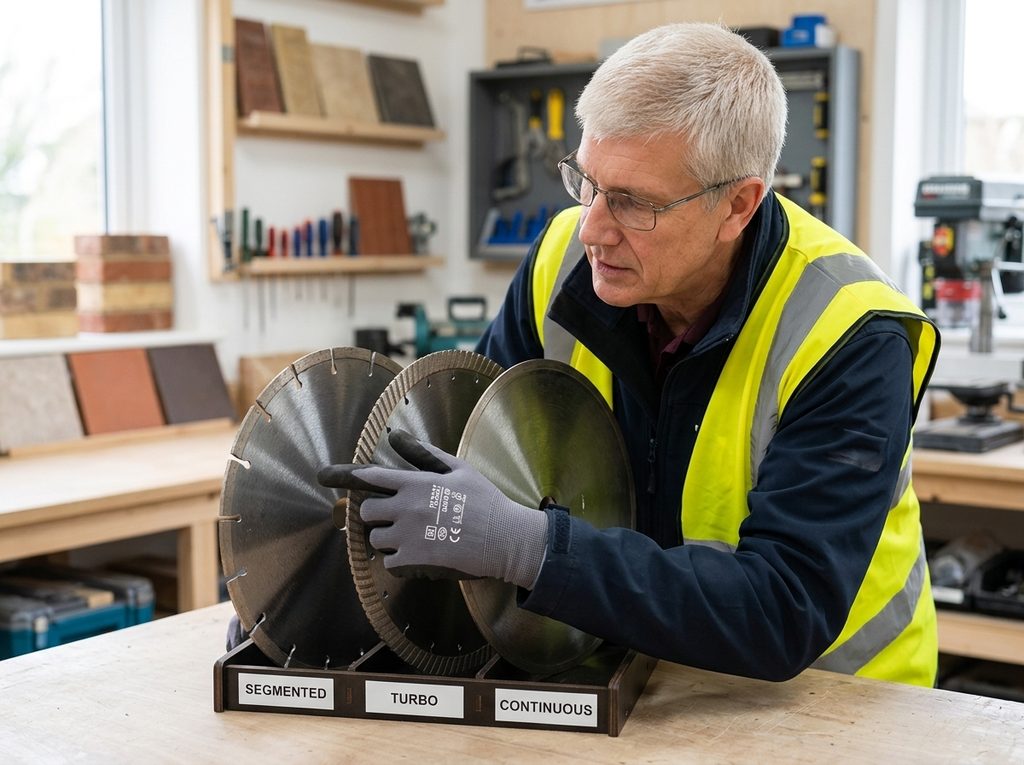
The diamond blade segment types matter too, and picking the wrong one costs you finish quality or blade life. Segmented, turbo, continuous rim: each has a job, and the next section breaks down which one to reach for.
Diamond Blade Segment Types Explained
The comparison table settles why diamond beats steel on hard materials. Next question: which diamond blade types? That starts with the rim.. Three rim styles exist, and each earns its place on a different job.
Segmented Rim Blades: Fast, Aggressive Cutting
A segmented rim has deep gullets cut into the edge, leaving distinct teeth separated by gaps. Those gaps do real work. They let air flow through the cut, pulling heat away from the rim and clearing slurry and debris. The result is the fastest, most aggressive diamond blade you can buy.
Segmented blades are the default choice for concrete, block, brick and asphalt. When I need to cut a concrete slab or knock down a block wall, I reach for a segmented blade without thinking. The trade-off is finish quality.
The same gaps that keep the blade cool also leave a rougher edge. If the cut will be hidden behind trim or buried in a joint, that roughness costs you nothing.
If the cut face is the finished surface, you need a different rim.
Product Recommendation: Segmented diamond blades from 4″ to 10″ handle general-purpose concrete and masonry cutting, wet or dry, with a limited lifetime warranty.
Turbo Rim Blades: Balanced Speed and Finish
A turbo rim replaces the deep gullets with a continuous edge cut in a serrated, ridged pattern. The ridges create smaller channels that still move air and debris, but the cutting surface stays in contact with the material more consistently. That puts turbo in the middle ground: faster than continuous, cleaner than segmented.
Turbo blades work well on concrete, masonry, stone, and asphalt. They are the blade I grab when the cut will be seen but does not need to be perfect. A concrete countertop edge, a stone step, a paver that will sit exposed. The finish is good enough to skip secondary dressing in most cases.
Where turbo fails is chip-sensitive tile. The serrated edge bites too hard for porcelain and ceramic. Fit one to a tile saw and you will see chipping along the cut line before you finish the first pass.
Product Recommendation: Turbo diamond blades in 12″ to 24″ sizes cut concrete, rebar, asphalt, masonry, and stone quickly.
Continuous Rim Blades: Clean, Chip-Free Cuts
A continuous rim has a smooth, solid edge with no gaps of any kind. The blade grinds through material with constant contact, which produces the cleanest cut of the three rim styles. It is also the slowest. With no air channels, heat builds faster, and the blade has to work harder to clear debris.
Continuous rim blades are the only correct choice for tile, porcelain, ceramic and other brittle materials. The smooth edge does not grab or chip the surface. On a porcelain floor tile, a continuous rim with wet cutting leaves an edge clean enough to butt against a wall without a trim piece.
The porcelain tile came off the saw with chips along every visible edge. I had fitted a turbo blade to my tile saw for speed on a bathroom renovation, and the blade was fast. Too fast for the tile. Two tiles ruined before I stopped. I switched to a continuous rim, ran the saw wet, and the next cut came off clean enough to install without dressing. The slower cut cost me minutes. The ruined tiles cost me money and a return trip to the supplier.
That mistake is why I now treat rim selection as the first decision on any tile job.
Product Recommendation: Continuous rim diamond blades for tile, porcelain, and ceramic cost $7.95 to $62.95.
Expert Tip: For porcelain and ceramic tile, always use a continuous rim blade with wet cutting to prevent chipping; segmented and turbo blades are too aggressive.
Segment style is only half the story. The rim determines how the blade cuts, but the bond matrix determines how long it lasts and how it handles different materials. That is the next decision, and it is where most people get it wrong.
Bond Hardness Selection Guide: The Inverse Rule Explained
The segment style gets you close. Bond hardness is what makes or breaks blade life.
Understanding the Inverse Bond Rule
The inverse bond rule is simple: soft bond for hard materials, hard bond for soft materials. The logic sits in how diamond grit exposes itself. In hard, dense material like cured concrete and granite, a soft bond matrix wears away quickly, constantly revealing fresh, sharp diamond. In soft, abrasive material like green concrete or asphalt, a hard bond resists erosion so the diamond stays embedded long enough to do its work.
Key takeaway: match bond hardness inversely to material hardness.
Material-to-Bond-Hardness Reference Table
| Material | Bond Hardness | Why |
|---|---|---|
| Cured concrete | Soft | Hard, dense material needs bond to wear fast and expose fresh diamond |
| Granite/basalt/hard stone | Soft | Very hard stone requires aggressive bond wear to keep cutting |
| Green concrete (soft/abrasive) | Hard | Soft, abrasive material erodes bond quickly; hard bond resists |
| Asphalt | Hard | Highly abrasive; hard bond prevents premature segment loss |
| Brick (medium hardness) | Medium | Balanced wear rate suits medium-density material |
| Sandstone (varies) | Medium to hard | Abrasiveness varies by grit; harder bond for coarse, abrasive sandstone |
| Marble/limestone | Medium | Softer stone cuts easily; medium bond balances life and speed |
| Tile/porcelain | Medium to hard | Dense but thin; needs bond that resists glazing on hard porcelain |
Starting Point and Adjustment Strategy
Start with a mid-range general-purpose bond. Then watch what happens. If the blade glazes, the bond is too hard for the material. If it wears fast, the bond is too soft.
On a patio job last spring, I watched a colleague fight a hard-bond blade through cured concrete. Three cuts in, the segments were shiny and polished, the saw screaming but barely moving. He switched to a soft-bond blade and the same saw dropped through like the concrete had softened. That glazed, polished segment is the tell: bond too hard, diamond not exposing.
Expert Tip: Match bond hardness inversely to material hardness. Soft bond for hard, dense materials. Hard bond for soft, abrasive materials. Getting this backwards is the most common and most expensive mistake.
Bond hardness also interacts with cutting method, which changes how fast the matrix wears.
Wet vs Dry Cutting Decision Guide
Bond hardness works best when paired with the right cutting method. The inverse bond rule tells you which bond to pick; the wet-or-dry decision tells you how to run it.
When Wet Cutting Is Required or Strongly Preferred
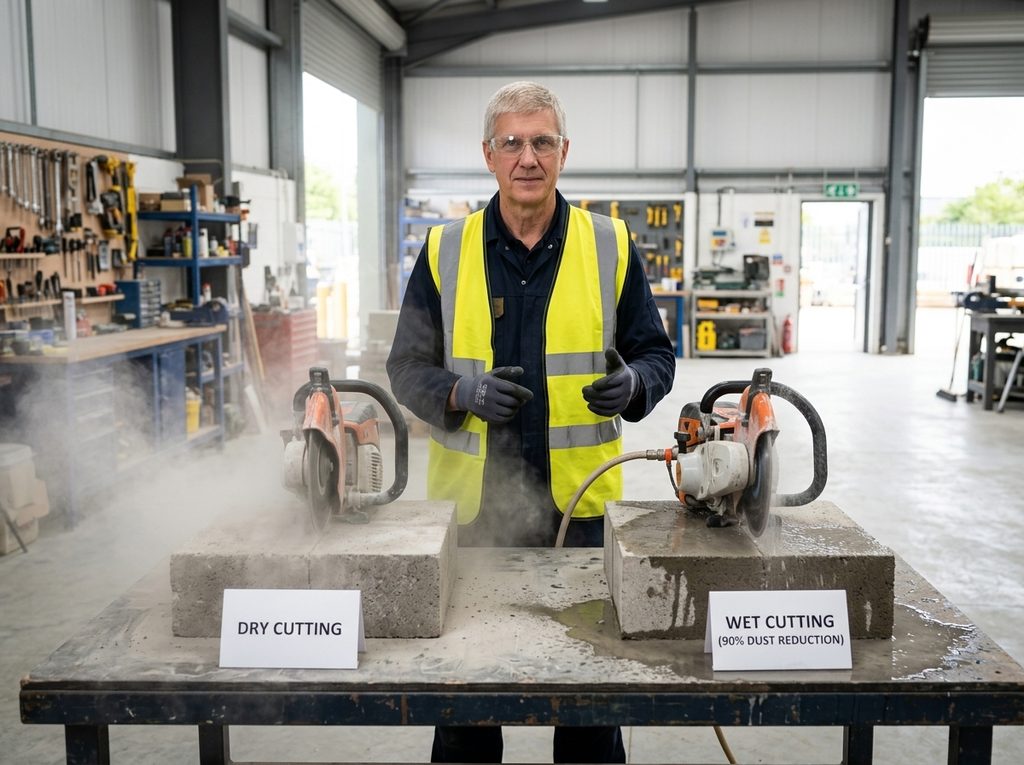
Water does two jobs at once. It cools the bond matrix and flushes abrasive slurry away from the cut. That combination extends blade life up to 40% compared with dry cutting. For hard, dense materials like concrete, stone, and masonry, wet cutting is the default. Heat builds fast in those materials, and without water the core can warp.
“Just run it dry, it’ll be fine,” a client told me on a small tile job, and I’ve now seen that pattern repeat across enough short cuts on soft material to agree, the heat never building up enough to warp the core, though I still reach for water on anything dense.
Dust suppression matters just as much as blade life. Wet cutting reduces airborne dust up to 90% compared with dry cutting. On a job site, that difference shows within the first few cuts.
Product Recommendation: For hard, dense materials, choose a wet saw with a water attachment system to cool the blade and suppress dust.
When Dry Cutting Is Acceptable
Dry cutting works only for short, shallow cuts on soft materials where heat buildup stays low. A quick trim on a soft brick or a shallow score on a tile is fine. Sustained dry cutting on hard materials risks core warping, and once the core warps, the blade is done.
Best practice: keep dry cuts short, lift the blade between passes to let air cool it, and watch for color change on the steel core. If the core starts to blue, stop and switch to wet, or let it cool.
Expert Tip: Use wet cutting for hard, dense materials whenever possible. It extends blade life up to 40%, cuts airborne dust up to 90%, and prevents core-warping heat.
Wet vs Dry Quick Decision Reference
Three things drive the decision: material hardness, cut duration, and available water supply. Blade type comes after those.
- Hard, dense material? Wet cutting.
- Long, continuous cuts? Wet cutting.
- Water available? Wet cutting.
- Soft material, short cut, no water? Dry cutting is acceptable.
The wet-or-dry call is one part of the decision. Next comes the full step-by-step selection process, where material, bond, arbor, and speed all line up.
Step-by-Step Blade Selection Process
With the principles covered, here’s the process. Skip a step and you either buy the wrong blade or mount an unsafe one. Seven steps, in order.
Step 1: Identify Your Material
Identify the material type, its condition, and anything embedded in it. Concrete with heavy rebar cuts differently than cured concrete with no steel. Brick with hard aggregate behaves differently than soft clay brick. Tile glazing, stone density, and embedded metal all change the blade choice downstream. Write down the material, its age, and what’s inside it. If you can’t identify the aggregate or reinforcement, stop and find out before you spend money.
Step 2: Determine Your Saw or Machine Platform
Check three things on the saw’s plate: diameter, arbor size, and no-load RPM. Diameter must match the blade’s rated diameter. Arbor must match the spindle exactly. No-load speed is the saw’s maximum RPM without load, and your blade’s RPM rating must meet or exceed it.
On a brick repointing job in a Victorian terrace, I grabbed a 22.23mm arbor blade for a saw with a 20mm spindle. The wobble was immediate. The blade chattered against the brick face, and I burned half a morning before I stopped to check.
The blade was ruined, and the saw’s spindle took a beating. The fix was simple: I bought the correct 20mm arbor blade and checked every blade against the spindle before mounting.
That mistake cost me a blade and a half-day of labour, and it taught me that arbor size is not a detail you eyeball.
Expert Tip: Verify arbor size against your saw spindle: 20mm, 22.23mm, or 25.4mm. Never use adapters, which cause vibration and unsafe operation.
Step 3: Select Blade Type (Diamond vs Steel)
Choose diamond or steel based on the material. All-purpose diamond blades cut concrete, masonry, tile and stone. Steel abrasive wheels cut metal and some masonry but wear fast and leave rough edges. If a steel wheel is all you have and the masonry job is small, it works as a stopgap. Expect slow cutting and a short life. For anything load-bearing or repeated, diamond is the only sensible choice.
Step 4: Choose Segment Style (Diamond Blades Only)
Select segmented, turbo, or continuous rim based on the material and the finish you need. Segmented rims cut fast and clear debris well, but they’re the ones that lose segments when you hit rebar or overheat. Turbo rims balance speed and smoothness. Continuous rims give the cleanest edge on tile and stone, at the cost of slower cutting and more heat when run dry. Match the segment style to the finish the job demands, not just the material.
Step 5: Match Bond Hardness (Diamond Blades Only)
Apply the inverse bond rule: hard material wears the bond matrix faster, so use a softer bond. Soft material wears the diamond grit faster, so use a harder bond. Start mid-range when unsure. A mid-range bond cuts most common materials acceptably, and you can adjust on the next blade once you see the wear pattern. Don’t overthink this step on a one-off job.
Step 6: Verify Technical Specifications
Check diameter, arbor, RPM, wet/dry rating, segment type, and bond hardness. Every one of these must line up with your saw and your material. A wet-rated blade run dry will overheat and crack. A dry-rated blade run wet is usually fine, but check the maker’s note. You already chose segment type and bond hardness, so confirm the blade in your hand matches the one you planned.
Expert Tip: Match the blade’s RPM rating to your saw’s no-load speed. A blade rated below the saw’s max RPM can overheat, warp, or break.
Step 7: Calculate Cost-Per-Cut for Your Project
Estimate cost-per-cut to confirm the economics. The math is simple: blade price divided by expected number of cuts. This is a sanity check, not a spreadsheet exercise. Compare the blade’s price against the manufacturer’s published cut-count range for your material. If one blade’s published range puts its cost-per-cut well above a competitor’s for the same material, that’s your answer. I do this on the back of a receipt, not in a calculator app.
For quick reference, use the decision flowchart next.
Material-to-Blade Decision Flowchart
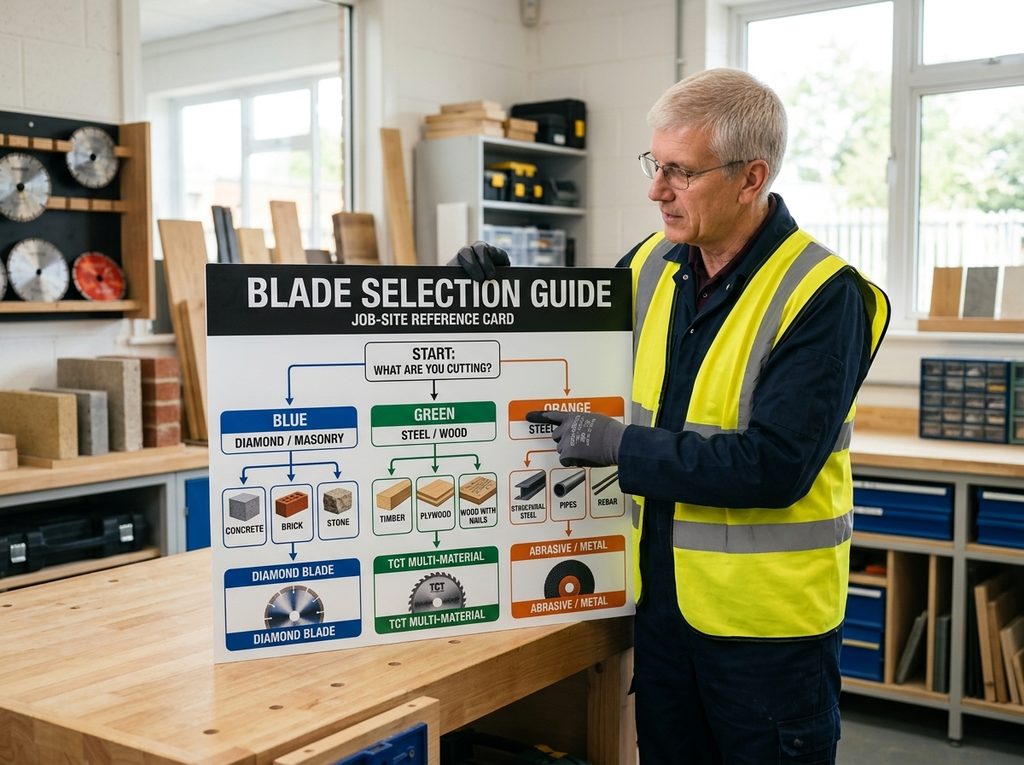
For a scannable path, use this flowchart. It runs material-first: identify the workpiece, then follow the branch.
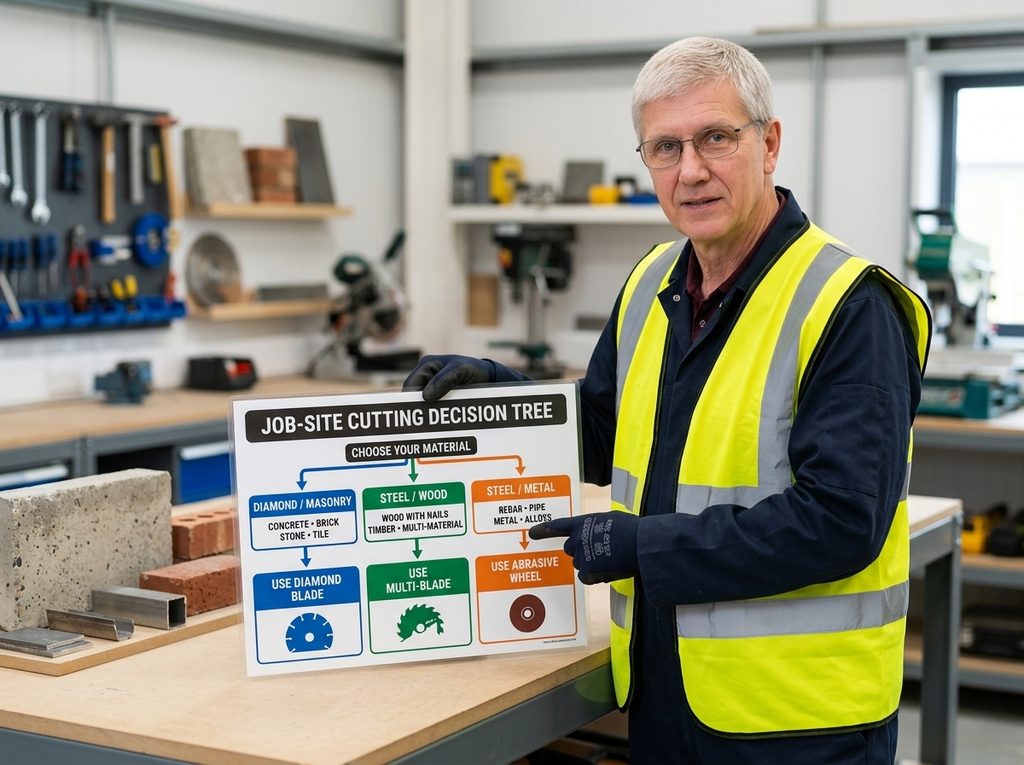
Interactive Decision Tree
Four branches split the decision at a glance:
- A: Masonry/diamond, concrete, brick, tile, stone. Hard aggregate demands a softer bond matrix so grit sheds and stays sharp.
- B: Wood, standard wood blades; diamond only for engineered or abrasive lumber.
- C: Metal, ferrous or non-ferrous; the blade must match the alloy.
- D: Mixed/specialty, when one blade must cross materials, cost-per-cut decides whether a specialty blade pays.
Each terminal lands on the inverse bond rule: harder material, softer bond. And each branch ends in cost-per-cut, not brand or price.
The high whine of a blade skating across hard aggregate told me I’d grabbed the wrong branch. A quick glance at a laminated chart beats standing there recalculating bond hardness. That’s why I keep a material-first tree taped inside my saw case.
Even the right blade runs into trouble sometimes. Troubleshooting comes next.
Common Problems and Solutions: Blade Troubleshooting Guide
You can match the right blade to the right material and still hit problems on the job. When that happens, the fix usually comes down to reading the blade’s symptoms correctly.
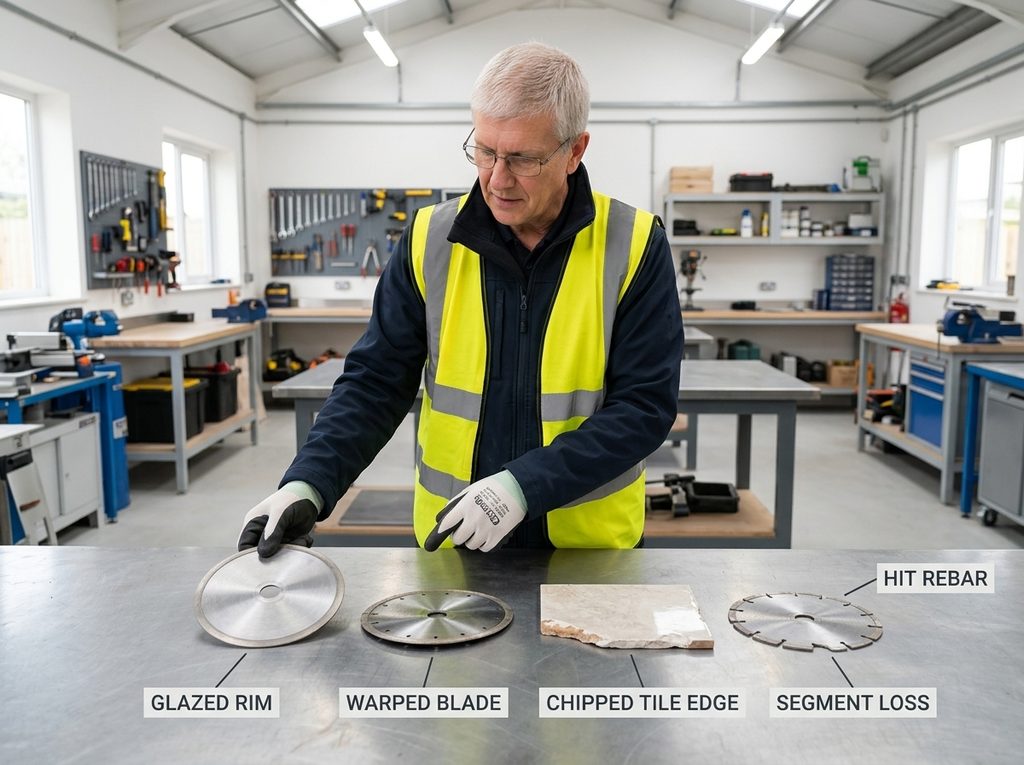
Problem 1: Diamond Blade Glazing (Blade Stops Cutting)
The rim looks smooth and shiny, almost polished, where you should see individual diamond grit. The blade spins but barely bites. Cut speed drops to a crawl.
What’s happened: the diamonds have worn flush with the bond matrix. No grit exposed means nothing to cut with, so the blade rubs instead of cuts. The blade was glazed solid by noon on the Whitfield job, and the tiler next to me was still forcing it through the same porcelain, wondering why every cut took three minutes. That’s glazing in action.
The fix is straightforward. Cut an abrasive material like soft brick or sandstone for a few passes. This wears back the bond and exposes fresh diamonds. If the blade glazes again on the same material, the bond is too hard for the job.
Expert Tip: Dress a glazed diamond blade by cutting soft brick or sandstone; this exposes fresh diamonds and restores cutting speed.
Expert Tip: If a blade glazes repeatedly on the same material, switch to a softer bond; the blade is too hard for the job.
Problem 2: Overheating and Core Warping
The blade shows a blue or brown tint near the rim. Lay it flat and it rocks. Spin it and you can see the wobble.
Sustained dry cutting on hard materials without cooling breaks is the usual cause. Heat builds up, the steel core expands unevenly, and the blade warps.
Add cooling breaks. Cut in short passes, then let the blade spin free for a few seconds to air-cool. Reduce feed pressure at the same time. For long dry cuts, switch to a blade rated for dry cutting or add water if the saw allows it.
Expert Tip: Let the blade do the work. Forcing it causes overheating, segment loss, and uneven wear.
Problem 3: Chipping and Cracking of Brittle Materials
The cut edge on tile, porcelain, or stone shows chips, spalling, or small cracks radiating from the cut line.
Three possibilities, and you need to diagnose before switching blades. The bond may be too hard, hammering the material instead of cutting cleanly. Feed pressure may be too high, forcing the blade through faster than it can cut. Or the blade may be dull, tearing rather than cutting.
Check the blade first. If it’s glazed, dress it. Reduce feed pressure and let the blade cut at its own pace. Sharp blade, moderate pressure, still chipping? The bond is too hard for that material. Switch to a softer bond or a blade rated for that specific material.
Problem 4: Premature Segment Wear or Segment Loss
Segments are missing from the rim, or they’re wearing down far faster than expected. You can see gaps where segments used to be.
Two main culprits. The blade hit rebar or another embedded metal, and standard masonry blades aren’t designed for steel. The impact tears segments off. Or overheating weakened the braze or laser weld holding segments to the core.
Check what you’re cutting. If rebar is present, switch to a steel-rated blade. Ensure adequate cooling. Inspect the blade after any impact. A cracked segment will only get worse.
Expert Tip: For rebar-heavy concrete, use a steel-rated blade; standard masonry blades shed segments fast.
Problem 5: Poor Cut Quality (Rough, Uneven, or Wandering Cuts)
The cut line drifts, the edge is rough, or the blade wanders mid-cut instead of tracking straight.
Three things to check. The arbor may be worn, so the blade doesn’t spin true. The blade may be bent or warped. Or the RPM is mismatched: the saw’s no-load speed exceeds the blade’s rating, or the blade is undersized for the saw.
Check the arbor first. If it’s worn or the blade wobbles on the spindle, replace the blade or the arbor adapter. Lay the blade flat. If it rocks, it’s bent and needs replacing. Verify the saw’s no-load speed against the blade’s RPM rating. The blade rating must meet or exceed the saw’s speed.
Problem 6: Blade Doesn’t Fit the Saw
The blade won’t mount, or it mounts but wobbles, or the arbor hole is the wrong size.
Arbor mismatch. The center hole must match the saw spindle exactly. A blade with the wrong arbor size can’t be safely mounted.
Check the arbor size on both the blade and the saw. They must match exactly. If the arbor is too large, use a proper arbor adapter ring, not a makeshift shim. If the arbor is too small, the blade is wrong for that saw. Don’t drill it out.
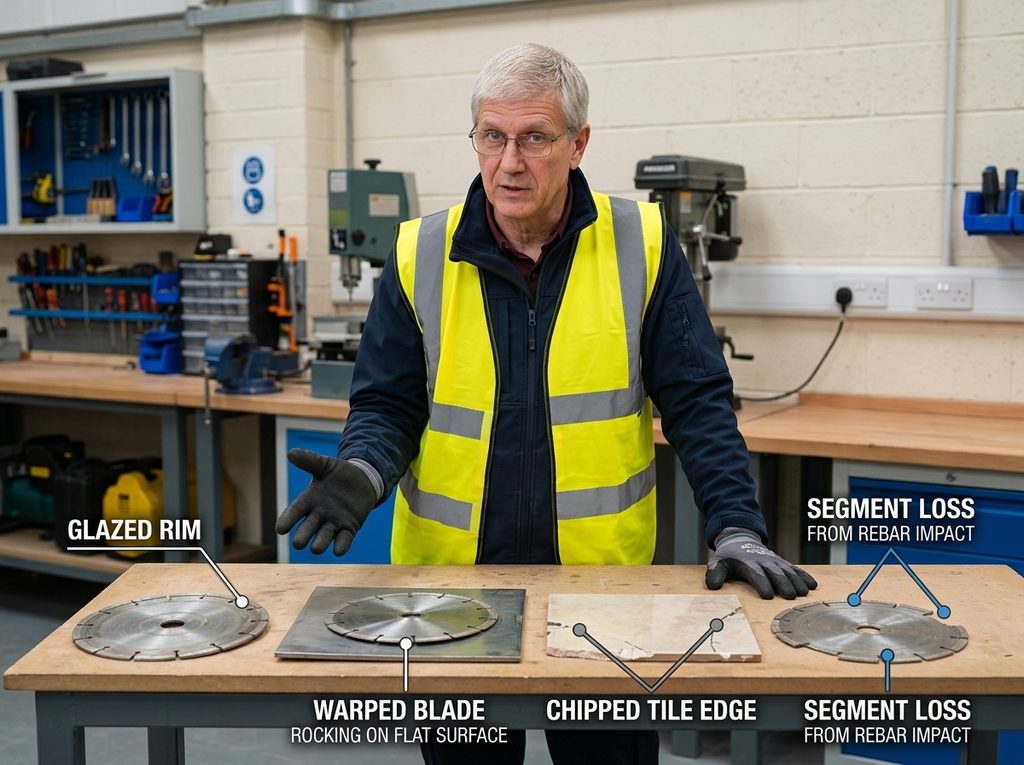
Diagnosing these six problems gets you back to cutting fast. The next question is whether the blade you’re fighting is worth the fight at all, which is where cost-per-cut comes in.
Cost Analysis: Upfront Price vs Cost-Per-Cut
Blade problems cost money. A segment that snaps off mid-cut, a core that warps from overheating, a wheel that shrinks below useful diameter after three passes: each failure hits the project budget in ways the sticker price never reveals. The true cost of a blade is what each cut costs you, not what the shelf tag says.
Why Upfront Price Is the Wrong Metric
A $70 diamond blade next to an $8 abrasive wheel looks like a reckless purchase on paper. The abrasive wheel is nearly nine times cheaper. But the math changes the moment you measure cost per cut rather than cost per blade.
Cost-per-cut is blade price divided by expected number of cuts. That single number tells you what you are actually spending every time the blade meets the material. A 14-inch abrasive wheel runs about $8 and delivers roughly three full-depth cuts before it has shrunk too far to reach.
That is $2.70 per cut. A budget diamond blade at $70 delivers between $0.28 and $0.47 per cut on concrete, depending on the material and how hard you push it. The gap is roughly six to ten times cheaper per cut with diamond. Upfront price hides that completely.
The grinder was still warm from the third wheel change of the morning when I stopped counting wheels and started counting cuts. A patio slab job in North Yorkshire, full-depth cuts through 4.5 inches of reinforced concrete, and every abrasive wheel died after three passes. Three cuts, then the wheel had shrunk enough that it could not reach the bottom of the slab. I watched the labourer walk back to the van for another wheel, then another, and the morning disappeared into wheel changes instead of cutting. The switch to a budget diamond blade came down to arithmetic, not technique. One blade, every cut that day, no changes. The wheel stack by the van stopped growing. That pattern has repeated on every concrete job since: the cheap option costs more the moment the cut count climbs past a handful.
Expert Tip: Calculate cost-per-cut, not sticker price: a blade that costs three times more can still be cheaper per cut if it delivers ten times the cuts.
Cost-Per-Cut Calculation Framework
The formula is simple: blade price divided by expected cuts per blade. For the abrasive wheel, $8 divided by 3 cuts equals $2.70 per cut. For the diamond blade, $70 divided by roughly 150 cuts (using the conservative $0.47 per cut figure) equals $0.47 per cut.
Break-even analysis tells you when the pricier blade starts paying for itself. A $70 diamond blade versus $8 abrasive wheels: the abrasive option costs $2.70 per cut, the diamond costs $0.47 per cut. The diamond saves $2.23 per cut. Divide the $70 blade price by that $2.23 saving and you get roughly 26 cuts. After 26 full-depth cuts, the diamond blade has paid for itself on consumable cost alone. Every cut after that is pure savings.
Consumable cost is only half the picture, though. Downtime cost must be added to get true project cutting cost. Every wheel change stops the work. On a job with 30 cuts, abrasive wheels need ten wheels and nine change-outs. If each change takes five minutes and labour runs $50 per hour, that is $37.50 in downtime alone. The diamond blade needs zero changes. That downtime cost pushes the real break-even point even earlier than 26 cuts.
Real Job-Site Cost Calculation Worksheet
The worksheet below lets you plug in your own job numbers. I have filled it with the 30-cut concrete example so you can see the structure in action. Replace every figure with your own material, cut count, blade prices, and labour rate.
| Field | Blade Option A: Diamond Blade | Blade Option B: Abrasive Wheel |
|---|---|---|
| Project Details | ||
| Material | Reinforced concrete, 4.5-5″ depth | Reinforced concrete, 4.5-5″ depth |
| Total linear meters/feet | 30 cuts × 1.5 m per cut = 45 m | 30 cuts × 1.5 m per cut = 45 m |
| Average cut length | 1.5 m | 1.5 m |
| Number of cuts | 30 | 30 |
| Blade Option | ||
| Blade price | $70 | $8 per wheel |
| Expected cuts per blade | ~150 cuts | 3 cuts per wheel |
| Cost-per-cut | $0.47 | $2.70 |
| Blades needed | 1 | 10 wheels |
| Total blade cost | $70 | $80 |
| Downtime minutes | 0 | 45 minutes (9 changes × 5 min) |
| Downtime cost | $0 | $37.50 (at $50/hr) |
| Total project cutting cost | $70 | $117.50 |
| Comparison | ||
| Difference in total project cost | Diamond saves $47.50 | |
| Recommended option | Diamond blade |
Cost is one factor. Safety is non-negotiable, and the next section covers silica dust, PPE, and the operating practices that keep you alive on the job.
Safety, Dust Control, and PPE Requirements
Cost-per-cut means nothing if a blade sends you to the hospital. Safety comes first, every time. Here’s what you need to know.
Silica Dust Exposure: The Hidden Danger in Cutting
Cutting concrete, masonry, or tile releases respirable crystalline silica. Breathe enough of it and silicosis develops: scarred lungs, reduced capacity, and no cure. OSHA sets the permissible exposure limit at 50 µg/m3 as an 8-hour time-weighted average, with an action level of 25 µg/m3. Hit the action level and you’re required to start air monitoring and medical surveillance.
Wet cutting keeps silica out of your lungs. On a basement slab job last spring, I logged roughly forty linear feet of cuts before lunch, water running the whole time. The dust never became visible. That’s the point of the 90% reduction wet cutting buys you: you stay so far under the 25 µg/m3 action level that the exposure barely registers. Dry cutting that same slab would have pushed the numbers into territory I don’t want to think about.
Required PPE for Cutting Operations
Minimum PPE for any cutting operation: a NIOSH-approved respirator, safety glasses, hearing protection, and gloves. Add a face shield for dry cutting, where debris flies faster and dust hangs in the air.
Safe Operating Practices
Inspect the blade before each use. Check for segment loss, cracks, or warping. Verify the arbor matches your saw spindle exactly. Confirm the blade’s RPM rating meets or exceeds your saw’s no-load speed. Never exceed the blade’s maximum speed. A blade spinning faster than rated can throw segments or shatter, and that failure happens without warning.
Dust Control Methods
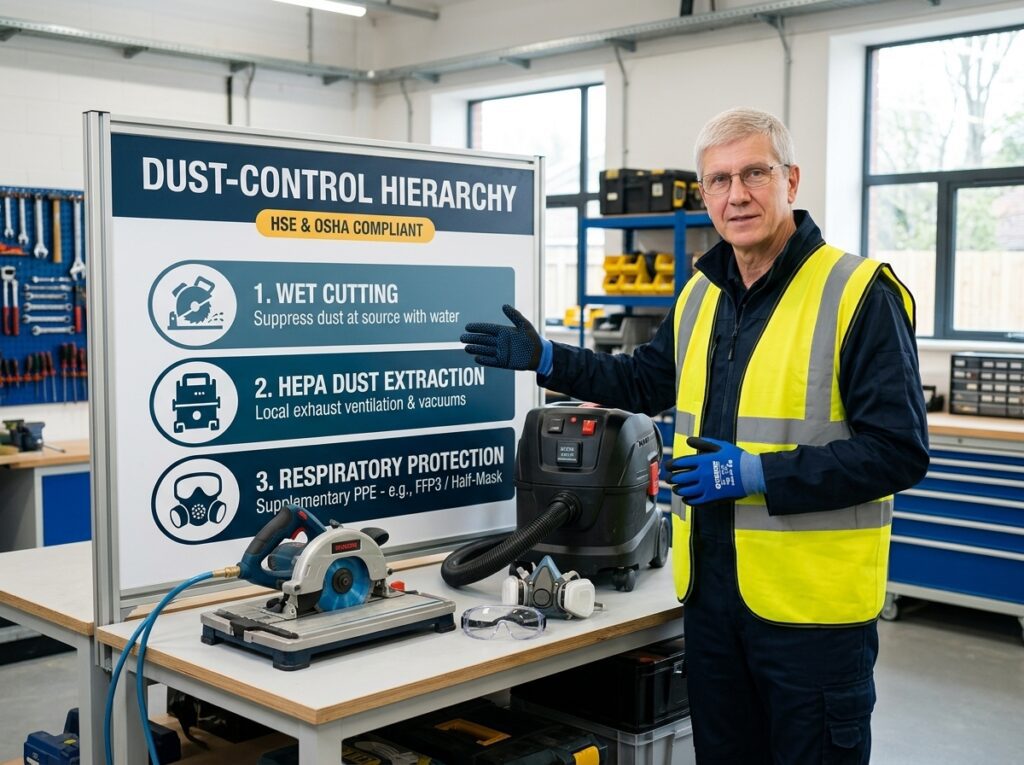
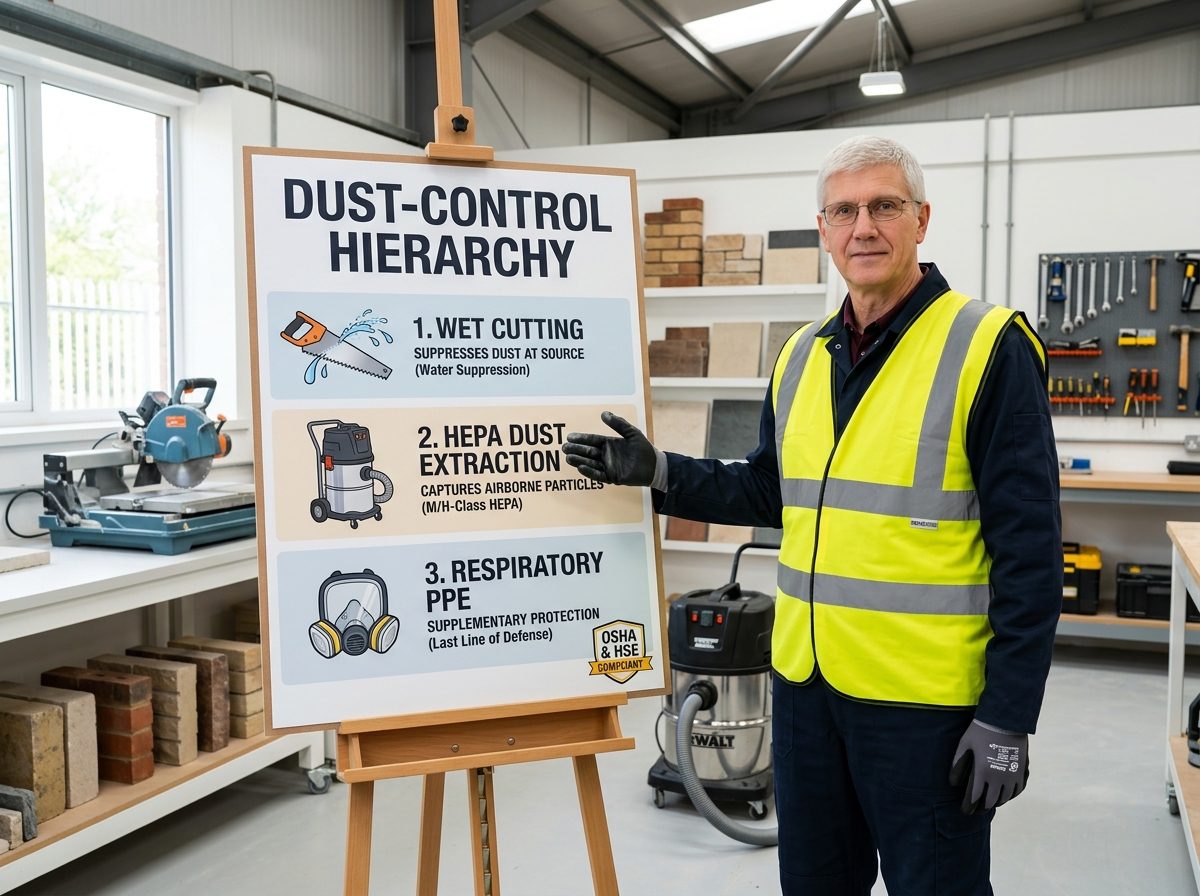
Wet cutting is the most effective dust control, reducing dust up to 90% and extending blade life up to 40%. Dust extraction with a HEPA filter captures what wet cutting misses. Administrative controls, like rotating workers and limiting exposure time, round out the hierarchy.
A blade that survives the cut still needs proper storage and maintenance to survive the next job.
Blade Storage and Maintenance Best Practices
Preventing problems starts before the blade ever touches material. Storage and inspection are the cheapest insurance you’ll buy on a job.
Proper Storage to Protect Blade Integrity
Would you hang a blade or lay it flat? I hang mine, every time, after a flat-stored blade’s bond matrix corroded on a damp shelf one January and its segments loosened before the first cut. Dry, flat, protected storage keeps the core from warping and the bond matrix from breaking down. Never stack blades, and keep segments off concrete floors.
Pre-Cut Inspection Routine
Before every use, check for cracks, segment loss, and arbor wear. A two-minute routine catches failure before it costs you a blade mid-job, which is what keeps cost-per-cut low.
Expert Insights and Job-Site Wisdom
Catalog specs tell you what a blade is supposed to do. The field tells you what it actually does.
Contractor Perspectives on Blade Selection
Start with the three-blade rule: a concrete blade, a brick blade, and a tile blade stay on the truck. That way you never force a hard bond through soft material. Rebar changes the math. A blade that hits steel loses segments fast, so you either switch to a softer bond or accept the loss and move on. Dressing matters too.
Run the blade through an abrasive block every few cuts to expose fresh diamond instead of letting the bond matrix glaze over. And check your RPM. Running a blade below its rated speed glazes the bond and kills cutting performance. Three blades in one morning. I watched a bricklayer burn through that many because he ran a hard-bond blade at low RPM on a mixer.
The segments glazed over, and he kept pushing harder. He blamed the blade, but the saw’s no-load speed was the real culprit.
That field logic is exactly what the conclusion ties together.
Choosing the Right Blade Is Choosing the Right Economics
All the principles come together on one question: what does each cut actually cost you?
Halfway through a run of hard brick on a garden wall job, the segments started rattling loose on a blade I had bought because it was cheap. The bond wore down fast, and I was back at the counter buying the blade I should have bought the first time. That pattern has repeated on every job site I have worked since. The blade that matches the material outlasts the bargain every time. The inverse bond rule is the whole game: hard material, soft bond. Soft material, hard bond. Get that right and the cost-per-cut takes care of itself.
Before you cut, check two things: the arbor fits the saw spindle exactly, and the blade RPM rating meets or exceeds the saw’s no-load speed. Then cut.